Our local library sponsored a guided bird-watching walk through the cemetery across the street. Most people brought binoculars. I brought my camera and a zoom lens. Here are the highlights:



And Other Bad Words
Our local library sponsored a guided bird-watching walk through the cemetery across the street. Most people brought binoculars. I brought my camera and a zoom lens. Here are the highlights:
This is one of the first spicy things I’ve made that my teenagers actually liked.
Originally seen on The Kitchn.
Beta made a child-appropriate educational video as part of her senior project. She did a great job. Enjoy!
It’s good to take a refresher course in empathy, from time to time. I may need it more often than most.
When someone appears to be having a moment, start by asking:
Do you want to be helped, heard, or hugged?
Follow their decision and go on from there.
For the source of the quote, and for a deeper discussion, see When Someone You Love Is Upset, Ask This One Question.
When you pay attention, you get to find out about cool stuff like watching the Minuteman reenactors practice their drills prior to the big day.
Alpha child and I took our cameras on a walk through the Goldsmith Woodlands.
 I have a new camera, an Olympus OM-D E-M10 Mark IV. (Their new naming scheme is kind of terrible, but the cameras are still good.) The last camera I owned was an Olympus OM-4, so using a digital camera is taking some getting used to.
Over time, Alpha has adopted my old OM-4, a Canon EOS DSLR from 2005, and a small number of truly vintage cameras. Today was a Canon kind of a day.
All of these photos were taken by me on my OM-D.




The forecast was for “a coating to an inch of snow, over by morning.”
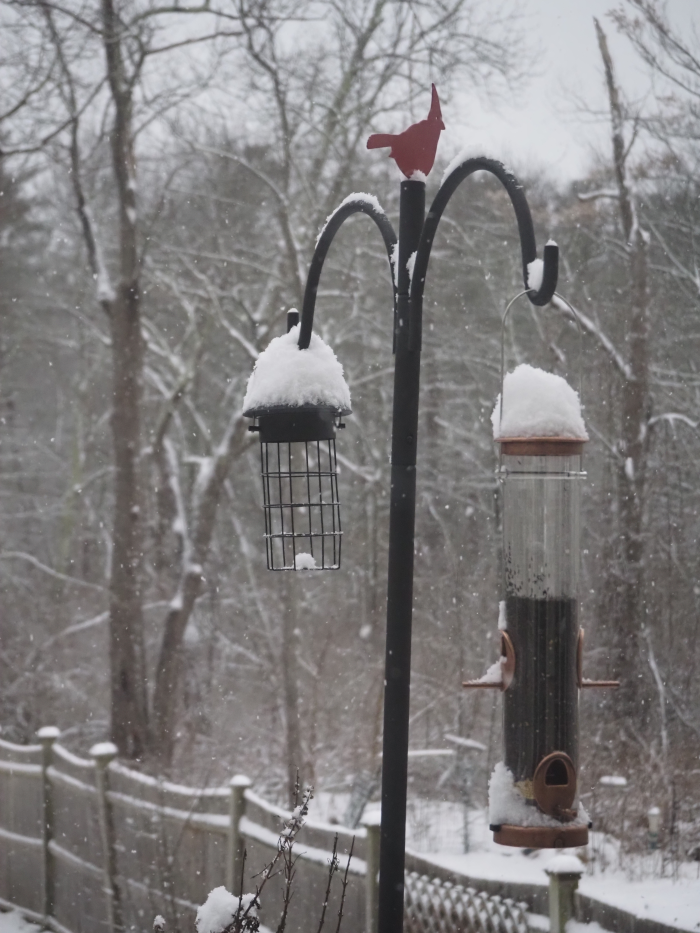
That… isn’t what happened.
We all went to see Six the Musical on Broadway.

We’ve been listening to the album since the spring of 2020, which is when we originally had tickets to see it. (until COVID-19 cancelled everything across the world.)
We did a lightning trip into NYC, driving in mid-day Saturday for a 3 pm show, and leaving the next morning.
I also brought along my newly-purchased camera, my first digital camera that wasn’t part of a smart phone, so I had to take some artsy-fartsy pictures.

I use Rexify to manage my servers. (I’m learning to treat my servers like cattle, not pets.) I have it distributing standardized config files, running updates, and more.
After adding a Raspberry Pi-based system to manage my backups, I was plagued with this error:
[2022-12-10 23:41:13] INFO - Running task Config:System:standard on backup
[2022-12-10 23:41:15] ERROR - Error executing task:
[2022-12-10 23:41:15] ERROR - Can't call method "stat" on an undefined value at /usr/lib64/perl5/vendor_perl/5.34/Rex/Interface/Fs/OpenSSH.pm line 70, <> line 144.
[2022-12-10 23:41:15] ERROR - 1 out of 1 task(s) failed:
[2022-12-10 23:41:15] ERROR - Config:System:standard failed on backup
[2022-12-10 23:41:15] ERROR - Can't call method "stat" on an undefined value at /usr/lib64/perl5/vendor_perl/5.34/Rex/Interface/Fs/OpenSSH.pm line 70, <> line 144.
The error didn’t make much sense, and wasn’t consistent. Not all Rex commands triggered it. When I did run into it, the same command executed directly on the server worked just fine.
Just to be clear: the problem had nothing to do with the system architecture. I.e. the fact that it was a Raspberry Pi, or an ARM device generally, was a red herring, but this was the first RPi that I had managed with Rex, and the only system with this problem, so I didn’t rule it out right away.
At first glance it appeared to be a bug in Rex, because that was the only thing that made sense. Why would it be complaining that it can’t call “stat” on an undefined file path, when the files are all clearly defined in my Rexfile configuration?
The line number referred to a place where Rex calls stat using SFTP. The actual value of $path was unknown to me, as I didn’t want to immediately jump into someone else’s code and start outputting debug info, but it seemed reasonable that it would either be the local or remote file, and the files should be clearly defined.
my $attr = $sftp->stat($path);
That seems pretty straight-forward. If this is a bug in Rex then other people should be encountering it.
Googling the error was rather unhelpful. That specific error, with quotes to search exact matches, returned no hits. An inexact match returned nothing helpful. Nothing about Rex, just a bunch of other applications doing other things. Let’s set that assumption aside and look elsewhere.
I could run simple commands using Rex, like ‘uptime’, to the server but more complicated things were a problem. The only common thread so far involved putting files. Could it be an issue with sending and receiving files?
Rex is configured to connect as root, there aren’t other users on the system (besides default and service accounts) to accidentally connect as, and the paths are all regular filesystem paths (not /dev or similar), so it’s almost certainly not a permissions issue.
Maybe a second SSH connection couldn’t be established; SFTP establishes an SSH connection and tunnels across it, after all.
I don’t set a common ControlMaster and ControlPath setting in my config, but I know from experience that if you do, and you force the first (“master”) to close, you’ll knock out other connections to the same host.
Well, I could connect via SSH just fine, using multiple simultaneous connections and opening / closing independently, so this clearly wasn’t an SSH connection problem. Time to look somewhere else.
Except I was wrong.
By ruling out SSH I missed a critical, based troubleshooting step: connect to my new server via SFTP and issue a couple of commands. When I finally tried it, after beating around the bush for far too long, I had my “duh!” moment.
Lo and behold, SFTP failed. I didn’t expect that could happen if SSH was fine.
Of course, it failed with an inscrutable error in batch mode:
$ echo "ls /" | sftp -b - backup
Connection closed.
Connection closed
Using the -v option was hardly more informative:
$ echo "ls /" | sftp -v -b - backup
OpenSSH_9.0p1, OpenSSL 1.1.1q  5 Jul 2022
debug1: Reading configuration data ...
<snip>
subsystem request failed on channel 0
Connection closed.
Connection closed
Getting out of batch mode and trying to get a prompt gave me a little bit more information, but only just:
$ sftp -v backup
OpenSSH_9.0p1, OpenSSL 1.1.1q  5 Jul 2022
debug1: Reading configuration data ...
<snip>
debug1: Sending subsystem: sftp
debug1: client_input_channel_req: channel 0 rtype exit-status reply 0
debug1: client_input_channel_req: channel 0 rtype eow@openssh.com reply 0
debug1: channel 0: free: client-session, nchannels 1
Transferred: sent 4528, received 4060 bytes, in 0.2 seconds
Bytes per second: sent 22612.3, received 20275.2
debug1: Exit status 127
debug1: compress outgoing: raw data 211, compressed 171, factor 0.81
debug1: compress incoming: raw data 918, compressed 764, factor 0.83
Connection closed.
Connection closed
Most disconcerting. Fortunately, my Google-fu still had some juice today, and I learned something new from the search results.
The best clue was the exit status 127: https://serverfault.com/questions/770541/can-connect-via-ssh-but-not-via-sftp-exit-status-127
SSH has something that appears to be a “legacy” option for configuring SFTP: the SFTP server subsystem.
Subsystem sftp <subsystem>You have three options:
internal-sftp, which uses code built into SSH/usr/lib64/misc/sftp-serverhttps://serverfault.com/questions/660160/openssh-difference-between-internal-sftp-and-sftp-server
The base Raspberry Pi image I used included the 2nd option in the default sshd_config file, pointing to a non-existent binary. Weird choice, but ok.
Subsystem sftp /usr/lib64/misc/sftp-serverThe internal subsystem is perfectly acceptable for many use-cases, and enabling it fixed my issue.
Subsystem sftp /usr/lib64/misc/sftp-serverSFTP now works. Testing show that Rex can distribute files to my Pi-server.
One could argue that Rex should catch an error like this and present something friendlier than a stack trace, but one could also argue that people should know what they’re doing when they stand servers up. SSH/SFTP doesn’t emit a useful error here, either, and having a verbose error (“SFTP server not active” or some-such) would be a lot more helpful.